Works in Your Browser
Winboost Casino runs as a progressive web app in any modern mobile browser, giving you instant access to the full game library without an App Store or Google Play download.
App at Winboost in the UK: No Download Needed
Play 7,000+ games, manage payments, and claim bonuses directly in your mobile browser — no download required on iOS or Android.
How to Start Playing Winboost on Mobile
Play Winboost Anywhere, on Any Device
Play 7,000+ games, manage payments, and claim bonuses directly in your mobile browser — no download required on iOS or Android.
Get Mobile Access 18+ only. Gambling may lead to addiction, and the bonus terms and conditions apply.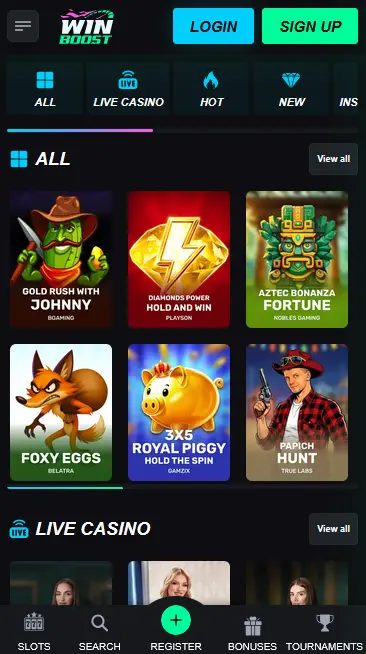
Safe Mobile Play at Winboost
What You Should Do
What You Should Avoid
Why Play Winboost on Mobile
Works in Your Browser
Winboost Casino runs as a progressive web app in any modern mobile browser, giving you instant access to the full game library without an App Store or Google Play download.
Fast Loading Across All Categories
The mobile site is optimised for speed on both iOS and Android, with the game lobby, cashier, and account tools all loading quickly even on standard mobile connections.
SSL Encryption and 2FA on Mobile
All mobile sessions at Winboost Casino are protected by SSL/TLS encryption. Two-factor authentication can be enabled in account settings for additional security when logging in.
Winboost Mobile — Strengths and Limitations
Pros
Cons
Device and Browser Compatibility
Android
iOS
Managing money at Winboost Casino works identically on mobile as it does on desktop. The full cashier is accessible in the mobile browser, covering all supported payment methods without requiring an app download.
Winboost accepts both fiat and cryptocurrency payments on mobile. UK players can deposit and withdraw using Visa, Mastercard, PayPal, Skrill, and Neteller as fiat options. Bitcoin, Ethereum, and Litecoin are available for players who prefer crypto. Bank transfer is also supported for larger transactions. The minimum deposit on most methods is £10; the minimum qualifying deposit for the welcome bonus is £20.
| Method | Deposit Time | Withdrawal Time | Min. Deposit | Min. Withdrawal |
|---|---|---|---|---|
| Visa / Mastercard | Instant | Up to 5 working days | £10 | £20 |
| PayPal | Instant | Up to 24 hours | £10 | £20 |
| Skrill | Instant | Up to 24 hours | £10 | £20 |
| Neteller | Instant | Up to 24 hours | £10 | £20 |
| Bank Transfer | Same day | Up to 5 business days | £50 | £100 |
| Bitcoin (BTC) | Up to 1 hour | Up to 4 hours | £10 | £20 |
| Ethereum (ETH) | Up to 1 hour | Up to 4 hours | £10 | £20 |
| Litecoin (LTC) | Up to 30 minutes | Up to 4 hours | £10 | £20 |
All transactions through the Winboost mobile cashier are secured by SSL/TLS encryption. Winboost does not charge platform fees on deposits or withdrawals. Your payment provider may apply their own fees, which are separate from Winboost’s cashier. KYC verification must be completed before your first withdrawal can be processed; submitting your identity documents early through the account portal avoids delays when you are ready to cash out.
The full Winboost game library of 7,000+ titles from 100+ studios is available in the mobile browser, with no content restricted to desktop only. The lobby adapts to portrait and landscape orientation, and category tabs, provider filters, and a search function all function in the same way as on desktop.
More than 5,000 slot titles are available on mobile, including Gates of Olympus and Sweet Bonanza from Pragmatic Play, Dead or Alive 2 from NetEnt, and high-volatility releases from Hacksaw Gaming and Nolimit City. Megaways engines and bonus-buy mechanics render correctly in mobile browsers. RTP figures are displayed on each game card before launch.
Evolution Gaming’s live tables, including Lightning Roulette, Crazy Time, and Infinite Blackjack, stream in real time in the mobile browser. Pragmatic Live’s One Blackjack and Speed Baccarat are also available. VIP live tables are accessible from mid-tier loyalty levels upwards.
Over 80 RNG table game variants covering blackjack, roulette, baccarat, and poker are available on mobile. European and French roulette, multi-hand blackjack, and video poker formats including Jacks or Better all load in the mobile browser without performance issues.
Progressive jackpot titles including Mega Moolah from Microgaming and Divine Fortune from NetEnt are fully playable on mobile. Live jackpot counters update in real time in the mobile browser, and must-drop jackpot slots are also available in this category.
Winboost Casino’s mobile experience is designed around a progressive web app (PWA) model, meaning the site behaves like a native app inside a browser without requiring installation from any store. The layout is responsive, automatically adjusting to the screen size and orientation of the device being used.
On Android devices, Winboost Casino performs best on Android 8.0 or later using Google Chrome at its latest stable release. Older Android versions may experience reduced performance on certain live casino streams. No Google Play download is available or required.
On Apple devices, Winboost Casino is fully supported on iOS 13 or later using Safari at its latest stable release. Chrome on iOS is also compatible. No App Store download is available or required. Adding the Winboost site to the home screen in Safari creates a shortcut icon that opens the mobile casino directly.
| Feature | Android | iOS |
|---|---|---|
| Recommended OS | Android 8.0+ | iOS 13+ |
| Recommended browser | Chrome (latest) | Safari (latest) |
| App store download | Not available | Not available |
| PWA / shortcut | Yes (Chrome) | Yes (Safari) |
| All payment methods | Yes | Yes |
| Full game library | Yes | Yes |
Winboost Casino does not have a native app to download. The casino is accessed entirely through the mobile browser. The steps below explain how to set up the PWA shortcut on Android and iOS so you get an app-like experience.
Open Google Chrome on your Android device and navigate to the Winboost Casino site. Tap the three-dot menu icon in the top-right corner of Chrome. Select Add to Home Screen from the menu. Confirm the name for the shortcut and tap Add. The Winboost icon now appears on your home screen and opens the mobile casino directly in Chrome when tapped.
Open Safari on your iPhone or iPad and navigate to the Winboost Casino site. Tap the Share button (the square with an upward arrow) at the bottom of the Safari toolbar. Select Add to Home Screen from the share menu. Confirm the name and tap Add in the top-right corner. The Winboost icon appears on your home screen and opens the mobile casino directly in Safari when tapped.
Because Winboost Casino runs as a PWA, the shortcut on your home screen functions in the same way as a native app icon — tapping it takes you straight into the casino without needing to open the browser manually and type the address. Updates to the PWA are applied automatically by the server, so you always have the latest version of the Winboost mobile site without needing to update through an app store.
The Winboost mobile experience covers the same full feature set as the desktop version, with no functions removed or restricted for smaller screens.
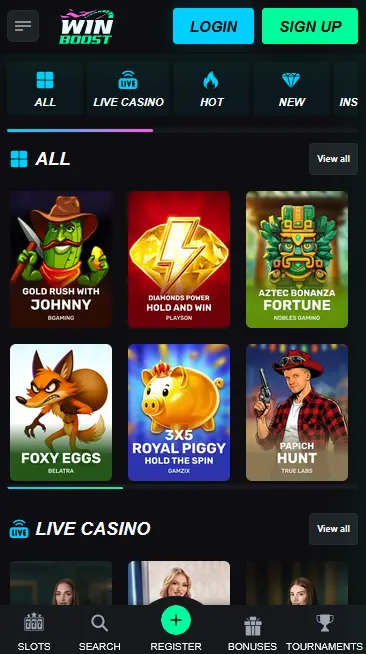
The mobile site includes the complete game lobby, the cashier, bonus activation and tracking through the My Bonuses dashboard, VIP loyalty progress, live chat support, account settings, and the responsible gambling toolkit. Live casino streams from Evolution Gaming and Pragmatic Live run in real time through the mobile browser. The search bar and category filters work in portrait and landscape orientations.
There is no functional difference between the Winboost mobile browser experience and the desktop browser version. Game libraries, payment options, and account tools are identical. The layout reorganises into a single-column structure on smaller screens for easier touch navigation, but no content is hidden or unavailable by category.
All Winboost Casino mobile sessions are protected by the same security framework as the desktop version.
SSL/TLS encryption with a minimum 128-bit key length secures all data transmitted during mobile sessions, including login credentials, payment details, and personal information. This standard is equivalent to that used by online banking applications.
Two-factor authentication is available for all Winboost accounts and can be enabled from the security section of the account settings. Once active, a verification code is required in addition to your email and password whenever a sign-in is detected from a new device, providing a meaningful barrier against unauthorised access even if credentials are compromised.
If your mobile device supports fingerprint or Face ID authentication, your browser may offer to use biometric login to autofill your Winboost account credentials. This is a browser-level feature rather than a Winboost-specific one, and its availability depends on your device model and browser settings.
New players can register a Winboost Casino account entirely from a mobile device. Tap the Register button, enter a valid email address, create a secure password, and provide the required personal details including your date of birth and address. Confirm your email via the verification link sent to your inbox. The process takes under three minutes and gives you immediate access to the full game library and promotions.
Returning players tap the Log In button on the Winboost mobile site and enter their registered email address and password. Two-factor authentication users will receive a verification code after the password step. The mobile session provides full access to your account balance, active bonuses, VIP status, and payment history. For detailed help with access issues, see the Winboost login page.
Every promotion available on desktop is also available in the mobile browser, including the welcome package, the weekly reload, and the Friday cashback scheme.
The four-part welcome package worth up to £2,500 plus 200 free spins on Book of Dead (Play’n GO) can be claimed and wagered entirely on mobile. Opt in to each step from the promotions section before depositing to activate the bonus. Wagering progress is tracked in the My Bonuses section of your mobile account dashboard. Full terms and wagering details are available on the Winboost bonus page. 18+ only. T&Cs apply.
No mobile-exclusive promotions are currently listed publicly at Winboost Casino. All promotions available on mobile are the same as those available on desktop, and players on higher VIP tiers may receive personalised offers directly from their account manager that are not listed on the public promotions page.
The 24/7 Winboost support team is reachable via live chat directly in the mobile browser, with no need to switch to desktop for assistance. Email support is available at [email protected] for detailed queries or document submissions. The help section in the account settings covers frequently encountered topics including KYC, bonus terms, and payment timelines.
All responsible gambling tools at Winboost Casino are accessible from the account settings on mobile, including deposit limits (daily, weekly, and monthly), session time reminders, loss limits, cooling-off periods, and self-exclusion options. These tools are governed by Winboost’s UK Gambling Commission licence requirements and take effect immediately when activated. If you need independent support, Gambling Therapy offers free, confidential assistance and can be found by searching the name directly.
Mobile Play Questions
No — Winboost Casino does not currently offer a native app through Google Play or the App Store. The casino is fully playable through the mobile browser on both iOS and Android devices, with all features including payments and bonuses available without a download.
Safari is recommended for iOS devices and Google Chrome for Android, both on their latest stable releases. The Winboost mobile site is also compatible with Firefox and Microsoft Edge on mobile, though Safari and Chrome provide the most consistent experience.
Yes — the four-part welcome package worth up to £2,500 plus 200 free spins on Book of Dead (Play'n GO) is fully claimable from the mobile browser. Opt in via the promotions section before making your qualifying deposit of at least £20. 18+ only. T&Cs apply.
Yes — PayPal is available in the mobile cashier for both deposits and withdrawals. Deposits are credited instantly and withdrawals are processed within 24 hours once KYC verification is complete.
Start Playing Winboost on Mobile Today
Get up to £2,500 and 200 free spins across your first four deposits. 18+.
Enter the Casino 18+ only. Gambling may lead to addiction, and the bonus terms and conditions apply.